
The Oregonian
OregonLive.com | Oregonian Media GroupNews & Magazines
3.6113.00 Reviews
- Version
- 8.0.0
- Installs
- 10.00K
- Age Rating
- Everyone 10+
Screenshots
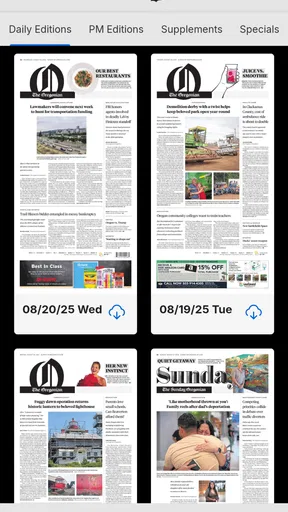


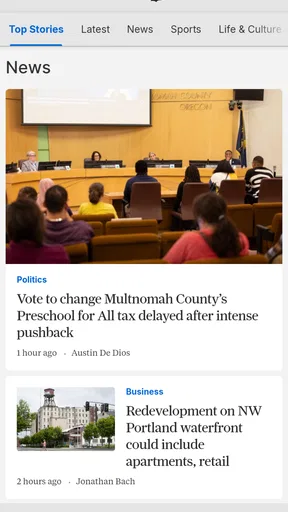
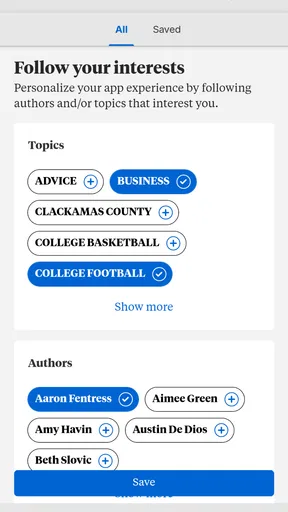
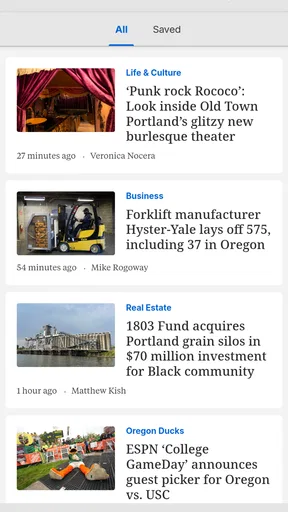


Our Review of The Oregonian
 Analysis by Appyee
I found The Oregonian most useful when I treated it as a shared doorway into local news rather than as a general-purpose news replacement. The app comes from OregonLive.com | Oregonian Media Group and focuses on the reporting associated with The Oregonian online newspaper. That makes it a natural fit for an Oregon household where different people want to keep up with the same region, even if they read at different times and care about different subjects.
My overall impression is positive but measured. It is free to install, and the app is rated for Everyone 10+, which makes it reasonable to consider for a family device or a shared tablet. At the same time, news apps are not automatically simple just because several people use the same screen. Accounts, subscriptions, reading habits, and personal boundaries still matter. I would recommend this app to readers who want a local news source close at hand, but I would not present it as a complete answer for every person in the home.
How it works in a shared household
A realistic use case is a kitchen tablet or a phone passed between household members during the day. One person may check local headlines with breakfast, another may read an arts or community story later, and someone else may open the app in the evening to catch up on developments that affect commuting, schools, neighborhoods, or public life. The value here is not that everyone has identical interests. It is that the same local publication can serve as a common reference point.
That shared-device role also exposes the app’s main practical challenge: a newspaper app is personal in ways a weather display or recipe app is not. Reading history, saved material, notifications, and any account connected to access can belong to one individual. I would avoid casually handing over a signed-in phone unless everyone understands whose account is active. On a personal phone, that is straightforward. On a family tablet, it deserves a small amount of planning.
I like the idea of using the app as a starting point for household conversations, especially when a local story affects everyone. A parent might read a report before discussing a community issue with a teenager; roommates might compare what they saw about a local event; or an older relative might use the app as a convenient way to stay connected to Oregon news without sorting through a large national feed. The important distinction is that the app supplies reading material, not a family coordination system. The household still needs its own way to decide who checks what and when.
Compared with a broad news aggregator, the appeal is focus. Aggregators are efficient when I want many publishers, national headlines, or a quick mixture of subjects. They can also make local reporting feel like one item among hundreds. The Oregonian is more purposeful: I open it because I want news tied to Oregon and the publication behind the app. That focus can reduce noise, although it also means it is not the best single app for someone who expects worldwide coverage, extensive source comparison, or a highly personalized stream from many outlets.
What I would decide before installing it
The first boundary is simple: decide whether the app is for one reader or for several. On a private phone, I would set it up around the owner’s habits and keep the account arrangement clear. On a shared device, I would agree that people should not change another person’s settings, read private material, or make access decisions on someone else’s behalf. Those sound like ordinary rules, but they prevent a surprisingly common problem with shared technology: one person assumes the device is communal while another assumes the account is private.
The app is free to download, but the presence of in-app items priced at $24.99 each means I would pay attention during setup and while exploring access. That does not make the app unsuitable for a household; it simply means the person responsible for the device should understand when a purchase or paid access decision might appear. I would not let a child explore payment screens unsupervised, even though the age rating is Everyone 10+. An age rating helps describe suitability, but it does not replace a household agreement about spending.
Another useful boundary is deciding what “local news” means for each reader. One person may want breaking developments, another may prefer longer reporting, and a third may only open the app when a story concerns their neighborhood. If everyone expects the same experience, disappointment is likely. I found it more practical to let each reader use the app differently while keeping the shared expectation narrow: use it for Oregon-focused news, and use another source when broader coverage or a second perspective is needed.
I would also keep the app’s software requirements in mind before choosing an older family device. The current version is 8.0.0 and requires Android 8.0 or later. That is not a concern on a recent phone, but it can matter with an aging tablet kept in the living room. Checking compatibility first avoids a frustrating setup where the household has already decided to share a device that cannot run the current release properly.
Keeping access and reading habits separate
One of my strongest recommendations is to separate the physical device from the person’s identity. If two adults share a tablet, they should decide whether one account will represent the household or whether each person will use their own arrangement. I would be especially careful not to assume that a shared device automatically creates shared access. A newspaper app may be easy to open, but that does not mean every reader should use the same account or make the same subscription choices.
This is also where the difference between free installation and ongoing access becomes important. The app costs nothing to install, but that does not mean every article or service-related action should be treated as universally available to every person using the device. I would explain that distinction to teenagers and guests in plain language: installing an app is one decision, while entering payment details or changing access is another.
For a household with children, I would keep the app’s Everyone 10+ rating in context. A ten-year-old may be able to navigate a news app, but local reporting can still cover difficult events, crime, disasters, politics, and other subjects that require conversation. The rating does not tell me what a particular child will find upsetting. I would let the child read with an adult nearby at first, then decide whether independent use makes sense based on maturity and the topics appearing in the news.
That approach is more realistic than pretending an age label can manage the experience by itself. The app is a publication reader, not a child-focused environment. If a household needs tightly curated material, a dedicated youth news product or an adult-selected reading list may be a better fit. If the goal is simply to help an older child understand local events, this app can work well when a parent remains available to explain context.
Coordination without turning news into a chore
Shared use works best when it does not require a complicated schedule. I would place the app where the intended readers can find it, then agree on a light routine rather than assigning formal shifts. For example, one person can check it in the morning, while another reads later in the day. The point is not to control every minute of reading; it is to avoid the device becoming a tug-of-war or one person assuming that everyone has already seen an important story.
A useful household habit is to mention the topic rather than simply saying, “You should read this.” Saying that a story concerns a nearby community, a public decision, or an event affecting travel gives the next reader a reason to open the app. It also respects different interests. Someone who ignores general headlines may still want a specific local report, while another reader may prefer to browse broadly.
I would not rely on the app alone for urgent coordination. A news article is useful for understanding an event, but it is not a substitute for direct messages, official instructions, or a household emergency plan. That distinction matters when several people share a device: the person who reads first should not assume that everyone else has received the information. News can inform the conversation, while the actual coordination still belongs in the family’s normal communication channel.
There is also a quieter benefit to a shared local-news habit. It can reduce the number of separate links and screenshots passed around the home. Instead of one person finding a story through a social feed and another seeing a different summary, the household can start with the same publication and discuss what each person understood. I still prefer checking important subjects from more than one source, but a focused local app gives the conversation a stable beginning.
Where this app fits among other news choices
When I compare The Oregonian with a national news app, the difference is not necessarily quality versus weakness; it is purpose. A national app is usually better for a broad overview of the country and the world. This one makes more sense when Oregon is the place I need to understand. For a reader who has recently moved to the state, it can be a practical way to build local awareness. For someone who already follows several Oregon sources, it may be a useful additional window rather than the only one.
Compared with social media, the app gives me a more intentional reading destination. Social platforms are fast at surfacing reactions and personal perspectives, but they also mix reporting with commentary, repetition, and unrelated material. I would rather begin with a publication-focused app when I want to read a local story carefully. I would still use social media to hear what people are discussing, but I would not treat a rapidly shared post as a replacement for reading the underlying report.
Compared with a browser bookmark, the app’s advantage is convenience. A dedicated app feels easier to reach when the purpose is simply “check The Oregonian.” The trade-off is that an app adds another installed product to manage, and shared devices make account and notification choices more noticeable. If I only read the publication once a month, a browser may be enough. If I check local news regularly, the app earns its place more easily.
The public response suggests a mixed but meaningful level of satisfaction. It has an average rating of 3.6 from around two hundred ratings, with over one hundred written reviews, and it has passed ten thousand installs. I read that as a reason to keep expectations grounded: the app has a real audience, but it is not something I would recommend blindly to every reader. The right question is whether its local focus matches the way the household actually consumes news.
Everyday strengths and points of friction
The strongest practical quality is concentration. Opening a publication-specific app can be calmer than entering a giant feed where local reporting competes with everything else. For me, that makes it easier to begin with a regional perspective and then decide whether I need more information elsewhere. It is particularly useful on a busy morning when I want to understand what is happening nearby without spending time building a local-news search from scratch.
The limitation is the same focus that makes it useful. Readers who want a single destination for local, national, international, business, sports, technology, and entertainment coverage may find themselves switching apps. That is not a flaw I would hide from a friend. I would install this for Oregon-centered reading, not as my only source for every subject.
Another trade-off is the possibility of access friction around paid items. The free installation lowers the barrier to trying it, but a household should not confuse that with a promise that every part of the experience will be handled the same way. I would set a clear rule that only the account owner makes payment decisions. This is especially important on a shared iPad or Android tablet where several people may assume that a visible button is safe to tap.
For readers who dislike accounts, payment prompts, or any separation between household use and individual access, the app may feel less convenient than simply reading occasional headlines elsewhere. For readers who value a consistent local source and are willing to manage those boundaries sensibly, the trade-off is easier to accept. My advice is to test it during an ordinary week, not only during a major news event. That reveals whether it genuinely fits the household routine.
Who should use it, and who should skip it
I would recommend it to Oregon residents who want a direct local-news habit, people settling into the state, and households that enjoy discussing nearby events from a shared starting point. It also suits readers who prefer opening a publication with a clear regional identity instead of relying entirely on algorithmic feeds. The app’s free entry makes trying it relatively simple, while the age rating gives families a starting point for deciding whether a younger reader should use it with guidance.
I would be more cautious about recommending it to someone who wants a fully international news dashboard, a child-only reading environment, or a completely account-free household experience. It is also not my first choice for urgent alerts or family safety coordination. Those needs call for direct communication and official channels, not a newspaper reader. Likewise, readers who already have a carefully curated collection of Oregon sources may gain less from adding another app unless they specifically value this publication’s approach.
Before installing it on a shared device, I would check three things: whether the device runs Android 8.0 or later, who will control account and purchase decisions, and whether the household is comfortable discussing mature news topics with younger readers. Those checks take little time and answer the questions that matter more than the download itself. They also prevent the common mistake of treating a shared screen as if it automatically creates shared privacy or shared permissions.
The developer, OregonLive.com | Oregonian Media Group, has positioned this as an online newspaper app rather than a general family organizer, and that distinction should guide expectations. I found its best role to be the household’s local-news reading option, not its communication center. Used that way, it can support conversation without pretending to manage the people having it.
My household verdict
After looking at the app through a shared-use lens, I see The Oregonian as a sensible choice for households that want Oregon news within easy reach and are willing to keep account boundaries clear. Its strongest case is specific: one publication, one regional focus, and a convenient way for different readers to stay connected to the same place. That is more useful than a generic headline feed when local context is the reason I am opening the app.
I would install it on a personal phone without much hesitation, then make a deliberate decision before placing it on a communal tablet. I would keep payment control with one adult, avoid sharing private account access casually, and introduce younger readers to the app with conversation rather than relying on the age label alone. Those steps are not complicated, but they make the difference between a smooth shared routine and unnecessary confusion.
My final recommendation is therefore conditional but clear: choose it if local Oregon reporting is central to your reading habits, and pair it with broader sources when you need wider coverage or a second perspective. Skip it if you are searching for a universal news app or a built-in family coordination tool. For the right household, its focused local identity is its real advantage; for everyone else, that same narrow purpose may be the reason to look elsewhere.
Verdict
Strengths of The Oregonian
- Clear local reporting focused on Oregon communities and events.
- App layout makes it easy to browse breaking news and latest stories.
- Useful coverage of politics, business, sports, and regional issues.
- Subscribers can access premium articles and additional digital content.
- Notifications help readers stay updated on important local developments.
Limitations of The Oregonian
- Many articles and features require a paid subscription.
- Some content may load slowly on weaker mobile connections.
- Ad presence can make browsing feel less streamlined for nonsubscribers.
- Coverage is highly regional and may feel limited outside Oregon.
- Notification frequency may become distracting for users who prefer fewer alerts.
Other Releases by OregonLive.com | Oregonian Media Group
View All
OregonLive.com
News & Magazines2.9
Similar Picks in This Category
View All
Google News - Daily Headlines
Google LLC4.0

X
X Corp.4.8

Flipboard:Your Social Magazine
Flipboard3.4

Opera News: breaking & local
Opera4.5

Hindi News by Dainik Bhaskar
Dainik Bhaskar Group4.0

Way2News Daily News App
Way2News ( Formerly Way2SMS )4.6
Frequently Asked Questions
What is The Oregonian app?
The Oregonian app is the mobile edition of The Oregonian/OregonLive, offering news and information focused on Oregon and the Pacific Northwest. After installing it, users can browse local and regional reporting, breaking news, politics, sports, entertainment, business, weather, and other features from their Android or iOS device. The layout is designed for reading on smaller screens and for keeping up with new stories throughout the day.
Is The Oregonian app free to download and use?
The app can generally be downloaded without an upfront charge, and some articles or features may be available to all users. However, access to the complete collection of stories, premium journalism, archives, or other subscriber-only content may require a paid subscription. Availability and pricing can change, so it is worth checking the subscription details shown in the app or on the official OregonLive website before signing up.
Do I need a subscription to read articles in The Oregonian app?
A subscription may be required for unlimited access. In practice, non-subscribers can often view selected content, while a digital subscription unlocks more articles and may include additional benefits depending on the current plan. If you regularly follow Oregon news, subscribing can provide a more consistent reading experience. Review the terms, renewal conditions, and included access before confirming any purchase.
Can I receive breaking-news notifications from The Oregonian?
Yes, The Oregonian app may send push notifications about breaking news, major local developments, weather events, sports updates, and other important stories. Notifications can be useful when you want immediate updates, but frequent alerts may become distracting. During setup, allow notifications only if they suit your preferences, and use your device settings or the app’s notification controls to adjust or disable categories later.
Does The Oregonian app work offline?
The app primarily depends on an internet connection to load current articles, images, videos, and live updates. Some content may remain temporarily available through caching, but users should not assume that every story can be read offline. If you are traveling or have limited data, open important articles while connected and consider using Wi-Fi to reduce mobile-data consumption, especially when viewing multimedia content.
